
TL;DR: The best Kubernetes alternatives in 2026 are Docker Swarm for small teams already on Docker, HashiCorp Nomad for mixed container and non-container jobs, Amazon ECS with Fargate for AWS shops, and Google Cloud Run for stateless services that scale to zero. K3s keeps Kubernetes but makes it light. Self-hosted options are free; managed ones bill by compute used, as of November 2026.
Kubernetes won the orchestration war. The CNCF 2025 annual survey found that 82% of container users run Kubernetes in production.
But winning doesn’t mean it fits every team. Kubernetes asks a lot of you. You run a control plane, write YAML for every object, pick a network plugin, set up ingress, and keep up with version upgrades.
Even the managed version costs money before you run a single pod. Amazon’s EKS pricing page lists $0.10 per cluster per hour on standard support, and $0.60 per hour once a version falls into extended support.
So a lot of teams ask a fair question. Do I need all this?
Often the answer is no. I compared 7 Kubernetes alternatives on setup effort, pricing model, lock-in and how hard it is to move your workloads. If you’re also rethinking your container runtime, read my guide to Docker alternatives, and if your monitoring bill grew with your cluster, see Datadog alternatives.
Quick Comparison: 7 Best Kubernetes Alternatives
| Tool | Best For | Starting Price | Key Feature |
|---|---|---|---|
| Docker Swarm | Small teams already on Docker | Free (built into Docker Engine) | Cluster from the Docker CLI |
| HashiCorp Nomad | Mixed containers, VMs and binaries | Free community edition | Single binary scheduler |
| Amazon ECS + Fargate | Teams all in on AWS | No ECS fee; pay for compute | No control plane to run |
| Google Cloud Run | Stateless APIs and web apps | Free tier, then per second | Scales to zero |
| K3s | Edge, labs and small clusters | Free, open source | Full Kubernetes under 100 MB |
| Red Hat OpenShift | Regulated enterprises | From $0.076/hour reserved | Kubernetes with guardrails |
| Rancher | Managing many clusters | Free open source; Prime quoted | One UI for every cluster |

What Makes a Good Kubernetes Alternative?
A good Kubernetes alternative runs your containers reliably with less to learn and less to operate. It should handle scheduling, health checks, rolling deploys, service discovery and scaling. The best choice depends on whether you want to run the platform yourself or rent it, and on how tied you are to one cloud.
Here’s what I weigh most.
Operational load. Count the moving parts you must patch and upgrade. Kubernetes has many. Swarm and Nomad have few. Cloud Run and Fargate have almost none on your side.
Workload fit. Long running services, batch jobs, stateful databases and GPU work all behave differently. Some tools handle only stateless HTTP services well.
Lock-in. A managed service is easy until you want to leave. Ask how your deploy files would move to another platform.
Ecosystem. Kubernetes has Helm charts, operators and a huge hiring pool. Every alternative gives up some of that. Be honest about whether you use it.
There’s one more split to know about. Some tools on this list replace Kubernetes. Others, like K3s, OpenShift and Rancher, still run Kubernetes underneath but change how much of it you touch.
Best Self-Hosted Kubernetes Alternatives
#1 Docker Swarm: Best for small teams already on Docker
Swarm is the shortest path from “docker compose up” to a real cluster.
What it does well. Swarm mode is built into Docker Engine, so there’s nothing extra to install. You run one command to start a manager and one to join workers. Your Compose files work as stack files with small changes. For a team of three running a dozen services, that’s a big win.
Key features:
- Declarative services with a set number of replicas
- Desired state reconciliation that replaces crashed tasks
- Overlay networks and built-in DNS service discovery
- Built-in load balancing across nodes
- Mutual TLS between nodes by default
- Rolling updates
Pricing. Swarm mode is free as part of Docker Engine. You pay only for your servers. Docker Desktop licensing is a separate matter and applies to developer laptops, not to your cluster nodes.
Best for: Small teams with a handful of services who want clustering without learning a new platform.
Limitations. The ecosystem is small next to Kubernetes. There’s no autoscaling built in, and observability and policy tools are thin. Don’t confuse Swarm mode with the old Docker Classic Swarm, which Docker’s docs say is no longer actively developed.
#2 HashiCorp Nomad: Best for mixed workloads beyond containers
Nomad is the alternative I’d pick when not everything you run is a container.
What it does well. HashiCorp’s docs describe Nomad as a single binary for both clients and servers, with no external services needed for coordination or storage. It schedules Docker containers, plain binaries, Java apps, Windows IIS and QEMU virtual machines. HashiCorp says Nomad has run production clusters above 10,000 nodes.
Key features:
- Service, batch and system job types
- Runs on Linux, Windows and macOS
- Pairs with Consul for service mesh and Vault for secrets
- Simple job files written in HCL
- Multi-region federation
Pricing. The community edition is free to download. Nomad Enterprise and HCP features are quoted by sales, so check the current price with HashiCorp. Note the license: HashiCorp moved its products to the Business Source License on August 10, 2023. Internal use is fine for most companies, but read the terms if you plan to sell Nomad as a service.
Best for: Teams with legacy binaries, batch jobs or Windows services next to their containers.
Limitations. You’ll likely add Consul and Vault, which brings back some of the complexity you were escaping. Helm charts and Kubernetes operators don’t carry over, and the hiring pool is smaller.
#3 K3s: Best for keeping Kubernetes but making it light
K3s isn’t really an escape from Kubernetes. It’s Kubernetes with the heavy parts trimmed.
What it does well. The K3s docs say it ships as a single binary under 100 MB. It installs in one command and runs well on small VMs and ARM boards. Because it’s a Kubernetes distribution, your manifests, Helm charts and kubectl skills all still work.
Key features:
- One binary with batteries included
- Low memory footprint for edge and IoT
- Runs on ARM single board computers
- Works in air-gapped and disconnected sites
- Same API as upstream Kubernetes
Pricing. K3s is free and open source. Commercial support is available through SUSE.
Best for: Edge sites, home labs, CI runners and small production clusters where full Kubernetes feels too heavy.
Limitations. You still own Kubernetes concepts, upgrades and YAML. It cuts the footprint, not the learning curve.
Best Managed Kubernetes Alternatives
#4 Amazon ECS with Fargate: Best for teams all in on AWS
ECS is AWS’s own orchestrator, and it’s far simpler than running EKS.
What it does well. AWS states there is no extra charge for ECS orchestration. You define a task, attach IAM roles, put it behind a load balancer and you’re done. Add Fargate and you don’t manage servers either.
Key features:
- Tight IAM, CloudWatch and load balancer integration
- Run on EC2 instances or serverless Fargate
- Fargate Spot for interruptible work
- Service auto scaling
- No control plane to patch
Pricing. On the EC2 launch type, you pay normal EC2 rates. Fargate bills for requested vCPU, memory and storage, rounded up to the second with a one minute minimum. AWS’s example rates for US East are about $0.0000112 per vCPU second and $0.0000012 per GB second of memory, as of November 2026. AWS says Fargate Spot is up to 70% cheaper but can be stopped with a 2 minute warning.
Best for: AWS-only teams who want containers in production this week, not this quarter.
Limitations. Task definitions are AWS-specific. Leaving AWS later means rewriting your deploy layer. Fargate also costs more per unit of compute than well-packed EC2 nodes at steady high load.
#5 Google Cloud Run: Best for stateless services that scale to zero
Cloud Run takes a container image and gives you an HTTPS endpoint. That’s the whole pitch, and it’s a good one.
What it does well. You push an image, and Cloud Run scales it with traffic, down to zero when idle. You don’t touch nodes, ingress or certificates. For APIs, webhooks and internal tools, it removes most of the platform work.
Key features:
- Scale to zero and fast scale up
- Request based or instance based billing
- Jobs for batch and scheduled tasks
- Generous monthly free tier
Pricing. Google’s Cloud Run pricing page lists a monthly free tier of 180,000 vCPU seconds, 360,000 GiB seconds and 2 million requests. Past that, Tier 1 regions charge $0.000024 per active vCPU second and $0.40 per million requests, as of November 2026. Billable time rounds up to the nearest 100 ms.
Best for: Stateless web apps, APIs and event handlers with uneven traffic.
Limitations. It’s not built for stateful workloads or long lived background workers. Cold starts can add latency unless you pay for minimum instances. And you’re tied to Google Cloud.
Best Enterprise Kubernetes Platforms
#6 Red Hat OpenShift: Best for regulated enterprises
OpenShift is Kubernetes with Red Hat’s opinions, security defaults and support contract on top.
What it does well. It bundles the parts you’d otherwise assemble: a registry, CI/CD, a developer console, monitoring and strict security policies. It runs the same way on premises and on major clouds. For banks, governments and big retailers, that consistency and the support contract matter.
Key features:
- Strict security policies by default
- Built-in developer console and pipelines
- Can run virtual machines next to containers
- Managed versions on AWS, Azure and IBM Cloud
- Long term enterprise support
Pricing. Red Hat’s OpenShift pricing page says reserved cloud instances start as low as $0.076 per hour, for a 4 vCPU worker on a 3 year contract, as of November 2026. Self-managed pricing depends on sizing and subscription, so check the current price with Red Hat.
Best for: Large companies that need audited security, hybrid cloud and a vendor to call.
Limitations. It’s still Kubernetes, plus more. It won’t make your platform simpler, only better supported. Costs add up fast across many nodes.
#7 Rancher: Best for managing many clusters from one place
Rancher doesn’t replace Kubernetes. It makes a fleet of clusters easier to run.
What it does well. Rancher calls itself an open source multi-cluster orchestration platform. You can provision, upgrade and set access policies across EKS, GKE, AKS and on-prem clusters from one UI. If your pain is “we have twelve clusters and no one knows their state”, this is the fix.
Key features:
- Central user and policy management
- Cluster provisioning and upgrades
- Works with any certified Kubernetes
- App catalog with Helm
- Rancher Prime for enterprise support
Pricing. The open source edition is free to run. Rancher Prime is the paid enterprise line, and SUSE does not list public prices, so check the current price with SUSE.
Best for: Platform teams running several Kubernetes clusters across clouds or sites.
Limitations. If your issue is Kubernetes itself, Rancher adds a layer rather than removing one. It shines only at fleet scale.
What About Apache Mesos?
Mesos shows up on almost every older list of Kubernetes alternatives. Skip it. The Apache Software Foundation retired Mesos in August 2025 and finished moving it to the Attic in October 2025.
That means no new releases and no security fixes from the project. If you still run Mesos or Marathon, plan a move now. Nomad is the closest fit for mixed workloads. Kubernetes or ECS fit if you’re mostly containers.
How Should You Choose the Right Kubernetes Alternative?
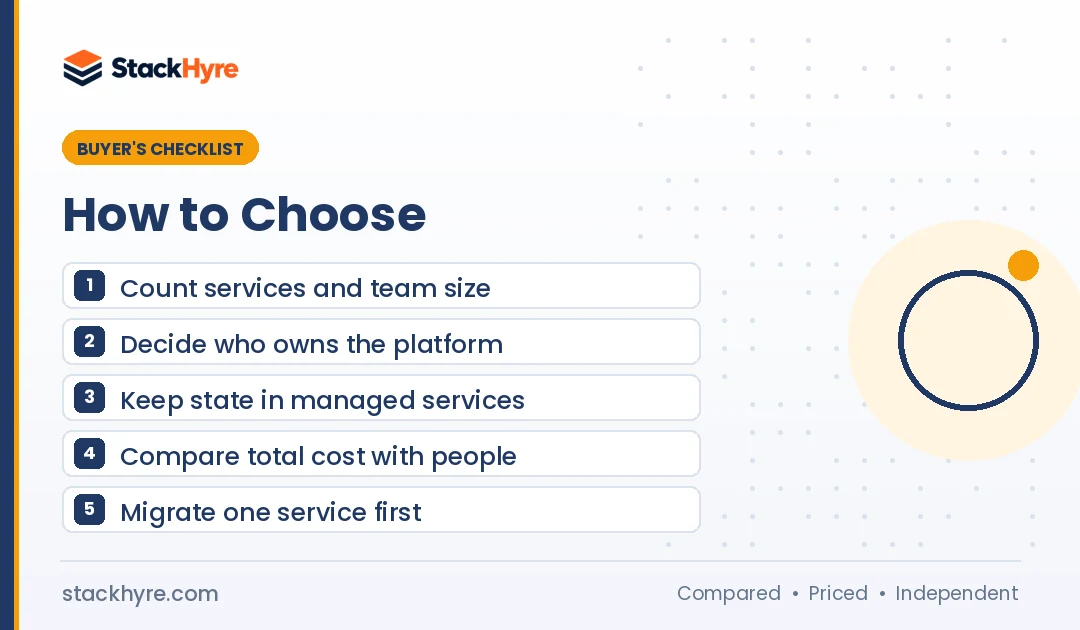
Start with your team size and your cloud. A small team on one cloud should usually rent: ECS with Fargate on AWS, Cloud Run on Google Cloud. A small team that self-hosts should start with Docker Swarm. Pick Nomad for mixed workloads, K3s for light Kubernetes, and OpenShift or Rancher only at enterprise scale.
Then work through these questions.
How many services do you run? Under 20 services, Kubernetes is often more platform than product. Past a few hundred, its ecosystem starts paying for itself.
Who runs the platform? If no one on your team wants to be on call for the cluster, choose a managed option. A self-hosted orchestrator with no owner is a slow outage.
How stateful are you? Databases and queues are hard on any orchestrator. Many teams keep state in managed services and run only stateless apps on containers. That makes Cloud Run and Fargate much easier to adopt.
What’s the real cost? Compare total cost, not list prices. Include engineer time spent on upgrades, on-call and debugging. A per-second managed service can beat cheaper raw compute once you count people.
How hard is the migration? Here’s how I’d rate the effort of moving off Kubernetes.
| Target | Migration Effort | What Changes |
|---|---|---|
| K3s | Low | Almost nothing; same manifests |
| Cloud Run | Low to medium | Stateless services only; new deploy config |
| ECS + Fargate | Medium | Rewrite manifests as task definitions |
| Docker Swarm | Medium | Convert to Compose stack files |
| Nomad | Medium to high | Rewrite as HCL jobs; add Consul and Vault |
My advice: move one non-critical service first. Run it for a few weeks. Watch deploy time, incidents and cost. Then decide on the rest.
And don’t forget the tools around the cluster. Error tracking and dashboards often need reworking too. My guides to Sentry alternatives and Grafana alternatives cover those.

How I Evaluated These Kubernetes Alternatives
I didn’t run benchmarks for this guide. I compared each option using public, checkable information, and I link to the source for every price and claim.
Here’s what I looked at:
- Published pricing. Vendor pricing pages, checked in November 2026. Where a vendor quotes by sales, I say so.
- Operational load. How many components you must install, patch and upgrade, based on official docs.
- Workload support. Stateless, stateful, batch, Windows and non-container jobs.
- License and project health. Open source license terms, license changes and whether the project is still maintained.
- Migration effort. How much of a typical Kubernetes setup carries over.
I also read the top ranking guides on this topic and included every tool that appeared on most of them, so you can see where each fits. You can read more about how I work in my editorial policy.
The Bottom Line
Kubernetes is the right tool when you have many services, a platform team and a need for its ecosystem. Most small and mid-size teams don’t have all three.
If that’s you, rent before you build. Use Cloud Run for stateless apps on Google Cloud and ECS with Fargate on AWS. Self-hosting? Start with Docker Swarm, and move to Nomad if you also run binaries, VMs or batch jobs. Want to keep Kubernetes but drop the weight? Use K3s. Save OpenShift and Rancher for enterprise fleets.
Whatever you choose, migrate one service first and measure.
Frequently Asked Questions
What is the simplest alternative to Kubernetes?
For self-hosting, Docker Swarm is the simplest because it’s built into Docker Engine and uses Compose-style files. For managed hosting, Google Cloud Run is simpler still. You give it a container image and it gives you a scaling HTTPS endpoint, with no nodes or cluster to manage. Both suit small teams with a modest number of services.
Is Docker Swarm still supported in 2026?
Yes. Swarm mode is part of Docker Engine and is documented on Docker’s site. What’s no longer developed is the old Docker Classic Swarm, a separate product. Swarm mode works fine for small clusters, but its ecosystem, autoscaling and observability tools are far thinner than Kubernetes, so check it covers what you need.
Is Nomad better than Kubernetes?
Nomad is simpler, not strictly better. It’s one binary, schedules containers, binaries and VMs, and HashiCorp says it scales past 10,000 nodes. Kubernetes has a much bigger ecosystem of Helm charts, operators and trained engineers. Pick Nomad for mixed workloads and a small ops team. Pick Kubernetes if you need its ecosystem.
Is Amazon ECS cheaper than EKS?
On the control plane, yes. AWS charges nothing extra for ECS orchestration, while EKS lists $0.10 per cluster per hour on standard support and $0.60 on extended support. Your compute costs are the same either way. The bigger saving with ECS is usually engineer time, since there’s less to configure and upgrade.
Should I still use Apache Mesos?
No. The Apache Software Foundation retired Mesos in August 2025 and moved it to the Attic in October 2025, so there are no new releases or security fixes. If you run Mesos or Marathon today, plan a migration. Nomad fits mixed workloads best, and Kubernetes or ECS fit container-only setups.
Related Articles

The StackHyre Editorial Team writes about proxies, web scraping and email infrastructure. We compare providers using published pricing, official documentation and third-party reviews. All content is for educational and informational purposes only.